Migrating Conductor to another directory
2026-02-28
I started using Conductor a few weeks ago and I’ve been loving it. But it quickly led to an unfortunate discovery: I really do not have space for ten worktrees, full of massive Rust build artifacts, on my MacBook’s half-terabyte internal disk.
I found a handy ‘Conductor root directory’ option in the Advanced settings. Great! I’ll just move it real qui…
This will permanently delete all your work in Conductor, including all repos and workspaces, and all files in the old root path. The new path should be an empty directory that you don’t modify directly.
Ah crap.
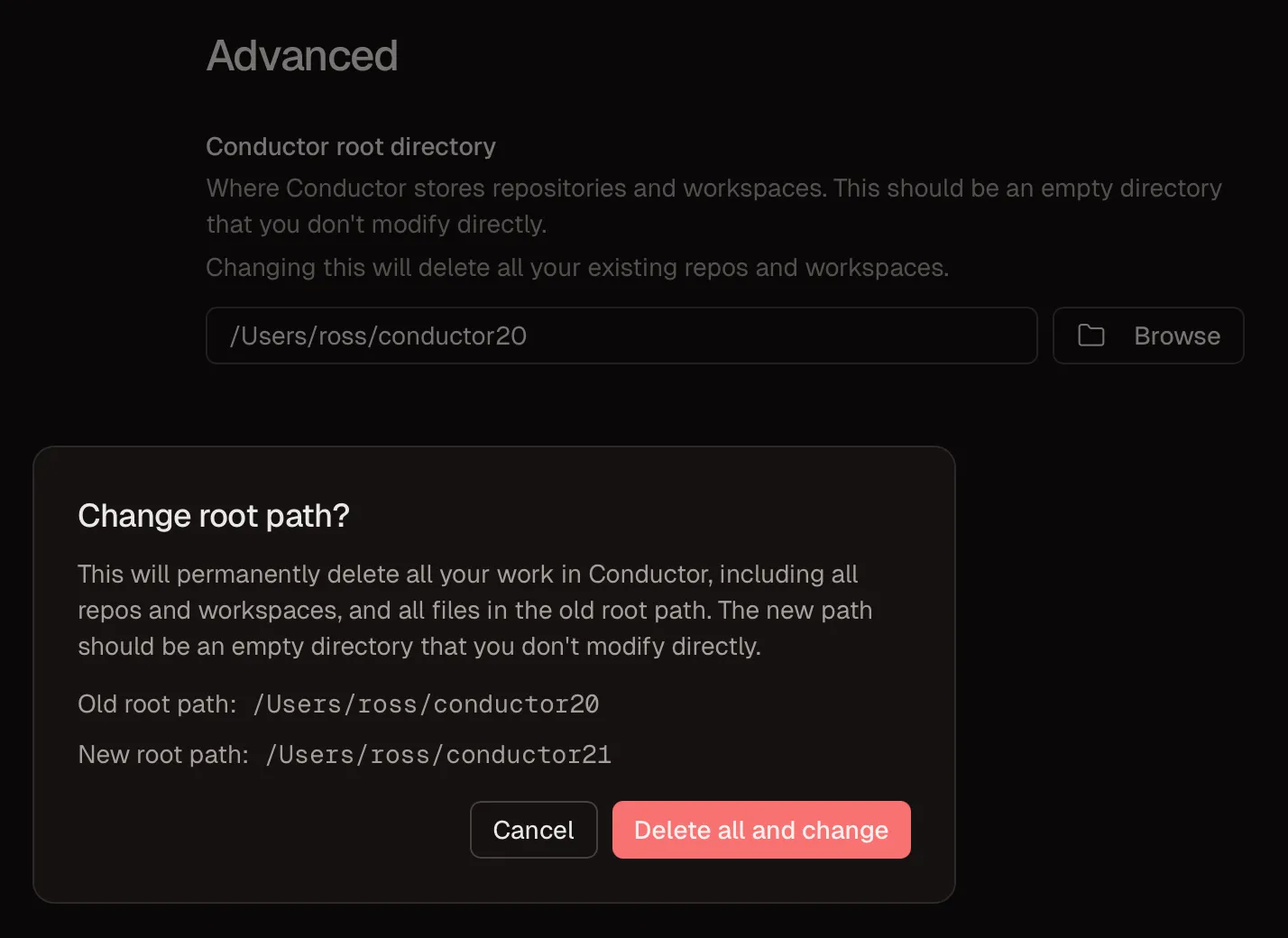
Moving Conductor to another directory
It turned out that migrating the Conductor root directory to an external disk was not as simple as just copying the files across from the old root directory to the new one. I know, because that’s the first thing I tried. Then I opened the app and everything was gone. Oops.
What next? Time to double down on the LLM-dependency. I just asked Codex to figure it out.
Before long it was rooting around in sqlite databases and using obscure git commands.
I thought it would be useful to document the sequence of steps that worked for me. In this example we’ll be pointlessly moving Conductor from /Users/ross/conductor to /Users/ross/conductor2, but you can of course pick any destination.
A couple of disclaimers:
- I get the impression that doing this is really not recommended by the developers of Conductor. You might lose all your chat history. That could be very annoying. Do this at your own risk!
- Everything from here onwards is wholly or co-written by an LLM.
And a suggestion:
- Don’t run this manually. Just launch your favourite LLM in yolo mode and let it do the work. Really.
Step-by-step guide
Conductor stores state in several locations:
SQLite Database and app state:
~/Library/Application Support/com.conductor.app/conductor.db(main database)~/Library/Application Support/com.conductor.app/conductor.db-wal,conductor.db-shm(WAL sidecar files)
Conductor working data:
- Conductor root path (configurable, e.g.,
/Users/ross/conductor)repos/- cloned repositoriesworkspaces/- git worktrees for each workspace
Other app state (optional to backup):
~/Library/Caches/com.conductor.app~/Library/WebKit/com.conductor.app~/Library/Preferences/com.conductor.app.plist
Claude Code session data:
~/.claude/projects/- contains path-slugged directories for each workspace’s Claude sessions
Migration Steps
1. Set up variables
Define these at the start and use them throughout:
OLD_PATH="/Users/ross/conductor"
NEW_PATH="/Users/ross/conductor2"
OLD_SLUG="-Users-ross-conductor-"
NEW_SLUG="-Users-ross-conductor2-"
db="$HOME/Library/Application Support/com.conductor.app/conductor.db"
2. Stop Conductor
osascript -e 'tell application "Conductor" to quit' || true
sleep 2
# Verify no Conductor process remains
pgrep -l -i conductor || echo "No Conductor process found"
3. Create a full backup
This backup allows complete rollback if anything goes wrong:
ts="$(date +%Y%m%d-%H%M%S)"
bdir="$HOME/conductor-backup-$ts"
mkdir -p "$bdir/library" "$bdir/conductor" "$bdir/claude-projects"

# Backup app state (most critical: the database)
rsync -a "$HOME/Library/Application Support/com.conductor.app/" "$bdir/library/com.conductor.app/"
rsync -a "$HOME/Library/Caches/com.conductor.app" "$bdir/library/" 2>/dev/null || true
rsync -a "$HOME/Library/WebKit/com.conductor.app" "$bdir/library/" 2>/dev/null || true
rsync -a "$HOME/Library/Preferences/com.conductor.app.plist" "$bdir/library/" 2>/dev/null || true

# Backup conductor data directory
rsync -a "${OLD_PATH}/" "$bdir/conductor/"

# Backup Claude Code project directories that will be migrated
for d in "$HOME/.claude/projects/${OLD_SLUG}"*; do
  [ -d "$d" ] && cp -R "$d" "$bdir/claude-projects/"
done

echo "Backup complete: $bdir"
du -sh "$bdir" "$bdir/library" "$bdir/conductor" "$bdir/claude-projects"

# Save the backup path for potential rollback
echo "$bdir" > /tmp/conductor-migration-backup-path
4. Copy conductor directory to new location
cp -R "${OLD_PATH}" "${NEW_PATH}"Or if moving to an external drive:
rsync -a "${OLD_PATH}/" "${NEW_PATH}/"5. Flush WAL before editing database
This ensures all pending writes are committed to the main database file:
sqlite3 "$db" "PRAGMA wal_checkpoint(TRUNCATE);"Expected output: 0|0|0
6. Create a database-only backup
Create an additional backup of just the database right before modifying it:
cp "$db" "${db}.pre-migration-$(date +%Y%m%d-%H%M%S).bak"7. Update paths in Conductor database
sqlite3 "$db" <<SQL
BEGIN IMMEDIATE;

-- Update repos.root_path
UPDATE repos
SET root_path = REPLACE(root_path, '${OLD_PATH}/', '${NEW_PATH}/')
WHERE root_path LIKE '${OLD_PATH}/%';

-- Update or insert conductor_root_path setting
INSERT OR REPLACE INTO settings (key, value)
VALUES ('conductor_root_path', '${NEW_PATH}');

-- Update settings (last_clone_directory, etc.)
UPDATE settings
SET value = REPLACE(value, '${OLD_PATH}/', '${NEW_PATH}/')
WHERE value LIKE '${OLD_PATH}/%';

-- Update workspace log paths if present
UPDATE workspaces
SET setup_log_path = REPLACE(setup_log_path, '${OLD_PATH}/', '${NEW_PATH}/')
WHERE setup_log_path LIKE '${OLD_PATH}/%';

UPDATE workspaces
SET initialization_log_path = REPLACE(initialization_log_path, '${OLD_PATH}/', '${NEW_PATH}/')
WHERE initialization_log_path LIKE '${OLD_PATH}/%';

-- Update attachments if any
UPDATE attachments
SET path = REPLACE(path, '${OLD_PATH}/', '${NEW_PATH}/')
WHERE path LIKE '${OLD_PATH}/%';

-- Optional: Update session_messages content (historical, not required for functionality)
UPDATE session_messages
SET content = REPLACE(content, '${OLD_PATH}/', '${NEW_PATH}/')
WHERE content LIKE '%${OLD_PATH}/%';

COMMIT;
SQL
Verify the updates:
# Check conductor_root_path is set correctly
sqlite3 "$db" "SELECT key, value FROM settings WHERE key = 'conductor_root_path';"

# Check other settings and repos
sqlite3 "$db" "SELECT key, value FROM settings WHERE value LIKE '%${NEW_PATH}%';"
sqlite3 "$db" "SELECT name, root_path FROM repos;"
8. Flush WAL again
sqlite3 "$db" "PRAGMA wal_checkpoint(TRUNCATE);"9. Repair Git worktree metadata
Git worktrees contain hardcoded paths that must be updated. For each repo, run git worktree repair with the new workspace paths:
# Get list of repos and repair their worktrees
sqlite3 "$db" ".mode tabs" \
  "SELECT name, root_path FROM repos WHERE root_path IS NOT NULL AND root_path<>'';" \
  | while IFS=$'\t' read -r name root_path; do
    echo "Repairing worktrees for $name..."

    # List workspace directories for this repo
    workspace_dir="${NEW_PATH}/workspaces/${name}"
    if [ -d "$workspace_dir" ]; then
      for wt in "$workspace_dir"/*/; do
        [ -d "$wt" ] || continue
        git -C "$root_path" worktree repair "$wt"
      done
    fi

    git -C "$root_path" worktree list
done
Or manually for each repo:
# For each repo, repair with the new workspace path
git -C "${NEW_PATH}/repos/my-repo" worktree repair \
  "${NEW_PATH}/workspaces/my-repo/workspace-name"
Verify the worktree links are correct:
# Check the .git file in a workspace points to the new repo location
cat "${NEW_PATH}/workspaces/my-repo/workspace-name/.git"
# Should show: gitdir: /Users/ross/conductor2/repos/my-repo/.git/worktrees/workspace-name

# Check the gitdir file in the repo points back to the new workspace
cat "${NEW_PATH}/repos/my-repo/.git/worktrees/workspace-name/gitdir"
# Should show: /Users/ross/conductor2/workspaces/my-repo/workspace-name/.git
10. Migrate Claude Code project buckets
Claude Code stores session data in path-slugged directories. These must be renamed to match the new path:
cd ~/.claude/projects
for old in ${OLD_SLUG}*; do
  [ -d "$old" ] || continue
  new="${old/$OLD_SLUG/$NEW_SLUG}"
  if [ -e "$new" ]; then
    echo "SKIP_EXISTS: $old -> $new"
  else
    mv -- "$old" "$new"
    echo "MOVED: $old -> $new"
  fi
done
Verify:
ls ~/.claude/projects/ | grep conductor
# Should show directories with the new path slug only
11. Delete Claude session index files
Claude Code maintains sessions-index.json files that cache session paths. These must be deleted so Claude regenerates them with the correct paths:
# Delete sessions-index.json files for migrated workspaces
rm -f ~/.claude/projects/${NEW_SLUG}*/sessions-index.json

# Verify deletion
ls ~/.claude/projects/${NEW_SLUG}*/sessions-index.json 2>/dev/null || echo "All sessions-index.json files removed (good)"
12. Update paths inside Claude session files
Claude session files (.jsonl) contain the workspace cwd path. If these aren’t updated, Claude Code will fail to resume sessions with “Query closed before response received” errors.
Important: Session files may contain paths from previous migrations (not just the immediately preceding path). For example, if you previously migrated from conductor to conductor2 and are now migrating to conductor3, sessions created during the conductor era will still have those original paths.
# Update ALL old conductor paths to the new path
# This handles sessions that were created during previous migrations
for f in ~/.claude/projects/${NEW_SLUG}*/*.jsonl; do
  [ -f "$f" ] || continue
  # Replace any path that looks like /Users/ross/conductorN/ where N is missing or < current
  # Adjust the regex based on your path naming pattern
  if grep -qE "${OLD_PATH%[0-9]*}[0-9]*/" "$f" 2>/dev/null; then
    echo "Updating: $f"
    # Replace the base path pattern with the new path
    sed -i '' -E "s|${OLD_PATH%[0-9]*}[0-9]*/|${NEW_PATH}/|g" "$f"
  fi
done

# If your paths don't follow a numbered pattern, use this simpler approach:
# for f in ~/.claude/projects/${NEW_SLUG}*/*.jsonl; do
#   [ -f "$f" ] || continue
#   if grep -q "${OLD_PATH}" "$f"; then
#     echo "Updating: $f"
#     sed -i '' "s|${OLD_PATH}|${NEW_PATH}|g" "$f"
#   fi
# done

# Verify no old paths remain
echo "Checking for any remaining old conductor paths..."
grep -lE "${OLD_PATH%[0-9]*}[0-9]*/" ~/.claude/projects/${NEW_SLUG}*/*.jsonl 2>/dev/null || echo "No old paths found (good)"
13. Final verification
# Check no old paths remain in critical fields
echo "=== Checking for remaining old paths (should all be 0) ==="
sqlite3 "$db" "SELECT 'repos', count(*) FROM repos WHERE root_path LIKE '${OLD_PATH}/%';"
sqlite3 "$db" "SELECT 'settings', count(*) FROM settings WHERE value LIKE '${OLD_PATH}/%';"
sqlite3 "$db" "SELECT 'attachments', count(*) FROM attachments WHERE path LIKE '${OLD_PATH}/%';"

echo ""
echo "=== Current conductor_root_path ==="
sqlite3 "$db" "SELECT value FROM settings WHERE key = 'conductor_root_path';"

echo ""
echo "=== Current repos ==="
sqlite3 "$db" "SELECT name, root_path FROM repos;"

echo ""
echo "=== Worktree status ==="
for repo in $(sqlite3 "$db" "SELECT root_path FROM repos WHERE root_path IS NOT NULL AND root_path<>'';"); do
  echo "Worktrees for $repo:"
  git -C "$repo" worktree list
done

echo ""
echo "=== Claude project directories ==="
ls ~/.claude/projects/ | grep conductor
14. Manual restart
This is required for an unknown reason. If you don’t do it, you will get errors about Claude Code exiting with error code 1 when you try to continue your conversations.
- Launch Conductor
- Quit it using Cmd+Q (not by closing windows)
- Wait a few seconds for all processes to terminate
- Launch Conductor again by clicking its icon in the Dock or Applications folder
Programmatic restarts (via osascript, open -a, or killing processes) do not clear this cache. Only a manual user-initiated quit and restart works.
Rollback Procedure
If anything goes wrong, you can fully restore from backup:
Quick rollback (database only)
If you just need to undo database changes:
# Stop Conductor
osascript -e 'tell application "Conductor" to quit' || true
sleep 2

# Find the most recent pre-migration backup
ls -la "$HOME/Library/Application Support/com.conductor.app/"*.bak

# Restore it (replace TIMESTAMP with actual timestamp)
cp "$HOME/Library/Application Support/com.conductor.app/conductor.db.pre-migration-TIMESTAMP.bak" \
   "$HOME/Library/Application Support/com.conductor.app/conductor.db"

# Remove WAL files to ensure clean state
rm -f "$HOME/Library/Application Support/com.conductor.app/conductor.db-wal"
rm -f "$HOME/Library/Application Support/com.conductor.app/conductor.db-shm"
Full rollback
To completely restore to pre-migration state:
# Stop Conductor
osascript -e 'tell application "Conductor" to quit' || true
sleep 2

# Get backup path (or set it manually)
bdir=$(cat /tmp/conductor-migration-backup-path)
# Or: bdir="$HOME/conductor-backup-YYYYMMDD-HHMMSS"

# Restore database and app state
rsync -a "$bdir/library/com.conductor.app/" "$HOME/Library/Application Support/com.conductor.app/"

# Remove WAL files
rm -f "$HOME/Library/Application Support/com.conductor.app/conductor.db-wal"
rm -f "$HOME/Library/Application Support/com.conductor.app/conductor.db-shm"

# Restore Claude project directories
for d in "$bdir/claude-projects"/*; do
  [ -d "$d" ] || continue
  base=$(basename "$d")
  rm -rf "$HOME/.claude/projects/$base"
  cp -R "$d" "$HOME/.claude/projects/"
done

# Optionally remove the new conductor directory
# rm -rf "${NEW_PATH}"

echo "Rollback complete. Restart Conductor."
Cleanup After Successful Migration
Once you’ve verified the migration works correctly:
1. Remove old conductor directory
# Double-check the new location works first!
rm -rf "${OLD_PATH}"
2. Remove database backups
# List backups
ls -la "$HOME/Library/Application Support/com.conductor.app/"*.bak

# Remove them
rm -f "$HOME/Library/Application Support/com.conductor.app/"*.bak
3. Remove full backup
# Get backup path
bdir=$(cat /tmp/conductor-migration-backup-path)

# Review what will be deleted
du -sh "$bdir"

# Remove it
rm -rf "$bdir"
rm -f /tmp/conductor-migration-backup-path
4. Remove old Claude project directories (if any remain)
# Check for any old directories
ls ~/.claude/projects/ | grep "${OLD_SLUG}"

# Remove them if found
cd ~/.claude/projects
rm -rf ${OLD_SLUG}*
Troubleshooting
“No branch found for workspace” errors
This happens when Git worktree metadata wasn’t properly repaired. Re-run the worktree repair step.
“CLAUDE CODE ERROR: NO CONVERSATION FOUND WITH SESSION ID”
This happens when Claude project buckets weren’t migrated. Check ~/.claude/projects/ for directories still using the old path slug and rename them.
Workspace shows wrong branch name
The Conductor database may have stale branch metadata. You can sync it from Git:
sqlite3 "$db" ".mode tabs" \
  "SELECT w.id, r.name, w.directory_name, w.branch FROM workspaces w JOIN repos r ON r.id=w.repository_id WHERE w.state='ready';" \
  | while IFS=$'\t' read -r wid repo dir dbbranch; do
    wt="${NEW_PATH}/workspaces/$repo/$dir"
    if [ -d "$wt/.git" ] || [ -f "$wt/.git" ]; then
      actual=$(git -C "$wt" rev-parse --abbrev-ref HEAD 2>/dev/null || true)
      if [ -n "$actual" ] && [ "$actual" != "$dbbranch" ]; then
        echo "Updating $repo/$dir: $dbbranch -> $actual"
        sqlite3 "$db" "UPDATE workspaces SET branch='$actual', placeholder_branch_name='$actual' WHERE id='$wid';"
      fi
    fi
done
Settings still show old path
Make sure the conductor_root_path setting was inserted/updated. Check with:
sqlite3 "$db" "SELECT * FROM settings WHERE key = 'conductor_root_path';"If missing, add it:
sqlite3 "$db" "INSERT OR REPLACE INTO settings (key, value) VALUES ('conductor_root_path', '${NEW_PATH}');"All done!
It’s me again, the human author of this post. Hope that was useful. Let me know below if you try it out.